Professional resume templates that show you are ready for the next role
Polished layouts for every industry and career stage. Clear structure, room for results in every role and formats that tracking software reads correctly, so you get noticed for what you have achieved.
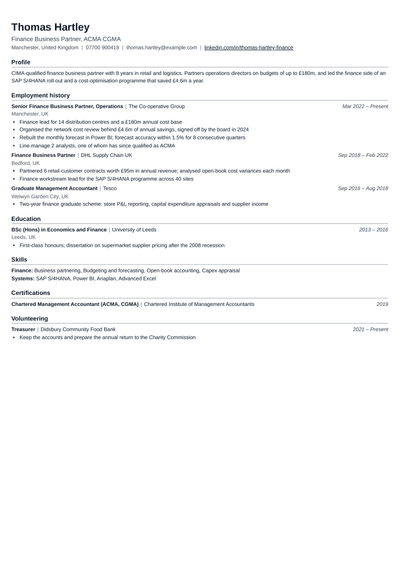
A professional resume template is a structured, formal layout built for people who want to be taken seriously by recruiters in established industries. It keeps a clear reading order, uses ruled section headings and a confident header, and gives each role enough space for three to five results. It sits between a plain simple layout and a colourful modern one: more structure than the first, less decoration than the second. Most professional templates here use one column, which suits tracking software, and a few use a narrow side column for skills.
What makes a resume look professional?
Consistency. The same date style, bullet style and spacing on every line.
Results, not duties. Each bullet shows what changed because of your work, with a number where possible.
A focused summary. Three lines on your level, your field and your strongest achievement.
Restraint. One font, one accent colour at most, no photos or icons unless your country format expects them.
Clean details. A professional email, a LinkedIn link that matches the resume and no spelling errors.
Are professional resume templates ATS-friendly?
Yes. Every professional template on this page uses standard section headings and real text, so applicant tracking systems can read your experience, education and skills. The one-column layouts are the safest choice for large companies that screen every application with software. The two-column layouts read well in most systems, but if you apply mostly through online forms, pick a one-column template and check your file in the ATS resume checker before you send it.
Which professional resume format fits your career stage?
Reverse-chronological: latest role first. The right choice for most people with a steady work history.
Combination: a short skills section first, then your roles in date order. Useful for career changers and people moving into management.
Functional: skills grouped by theme with dates kept light. Use it only for long gaps or very varied experience, because many recruiters prefer to see a timeline.
How to write a professional summary
Three lines: your title and years of experience, your best result with a number, and the role you want next. Sample summaries you can adapt:
Finance: "Chartered accountant with six years in audit and FP&A. Built a monthly close process that cut reporting time from ten days to four. Seeking a finance manager role."
Sales: "B2B sales manager with eight years in SaaS. Grew a regional book from 1.2 million to 3.4 million dollars in annual revenue in three years."
HR: "HR business partner with five years supporting 600 employees. Cut first-year attrition from 28% to 17% with a new onboarding plan."
Engineering: "Mechanical engineer with seven years in automotive manufacturing. Led a line redesign that raised output by 15% with no new equipment."
These are examples with made-up numbers. Use your own.
How to write achievement bullets
Use one pattern for every bullet: an action verb, what you did and the result. "Managed vendor relationships" says what you were responsible for. "Renegotiated contracts with 14 vendors, saving 9% on annual spend" says how well you did it. Lead each role with your biggest result, keep bullets to two lines, and use the past tense for past roles.
How to format a professional resume
Name in a larger size at the top, with contact details on one line below it.
Job title in bold, company and city next to it, dates aligned on the right.
Three to five bullets for recent roles, one or two for roles more than ten years ago.
Skills grouped by type, such as Finance, Tools and Languages, rather than one long list.
Certifications with the issuing body and year, such as "CFA Level II, CFA Institute, 2025".
Professional templates by industry
Wall Street: banking, investment and finance roles, where a dense, formal page is the norm.
Accountant: audit, tax and accounts roles, with space for certifications and software.
Consultant: project-based work, with room for client results.
HR: recruitment, people operations and HR business partner roles.
Sales Pro: quota, revenue and pipeline results up front.
Boardroom: directors and senior leaders, with a strong summary and leadership results.
Physician: doctors, with sections for registration, training and clinical experience.
IT Professional: support, infrastructure and systems roles, with a clear tools section.
Who should use a professional template?
Anyone with two or more years of work who is applying in a formal industry: finance, consulting, law, healthcare, government, engineering, HR or corporate roles in large companies. It also suits people moving up into a manager or senior role, because the structure gives each promotion and result its own space. Freshers in these fields can use one too, as long as education and internships come first.
Mistakes that make a resume look less professional
An email address that is not your name, or a LinkedIn profile with different dates.
Generic phrases such as "hardworking team player" with no proof behind them.
Listing every task in a role instead of the three or four results that matter.
Unexplained gaps. A one-line note such as "Career break, family care" is better than silence.
Sending the same resume to every job. Job-tailored resumes adjust your summary and top bullets to each job post in minutes.
Reverse-chronological, with your latest role first, in a clean one-column layout. It is the format recruiters in most industries expect and the one tracking software reads most reliably.
What is the difference between a professional and a simple template?+
A simple template is as plain as possible. A professional template adds a little structure, such as ruled headings, a stronger header or a narrow skills column, which helps longer careers stay easy to scan.
How long should a professional resume be?+
One page for under five years of experience and two pages for more. Senior leaders sometimes need two full pages, but the first page should hold your most recent and strongest results.
Should a professional resume have a summary or an objective?+
A summary. Three lines on your experience, your best result and the role you want tell a recruiter far more than an objective about what you hope to gain.
Can freshers use a professional resume template?+
Yes, especially for finance, consulting and corporate roles. Put education, internships and projects first, and keep it to one page.
What font looks most professional on a resume?+
Classic fonts such as Garamond, Georgia, Calibri or Arial at 10.5 to 12 points. The templates here set the font and spacing for you, so the page stays consistent.
How many bullet points should each job have?+
Three to five for recent roles and one or two for older ones. Each bullet should show a result, ideally with a number.
Do professional templates work for jobs abroad?+
Yes, but each country has its own rules on length, photos and personal details. If you are applying abroad, start from one of the resume formats by country.
Look ready for the job before the interview starts
Choose a professional template, add your experience or upload your old resume, and check your ATS score before you apply.