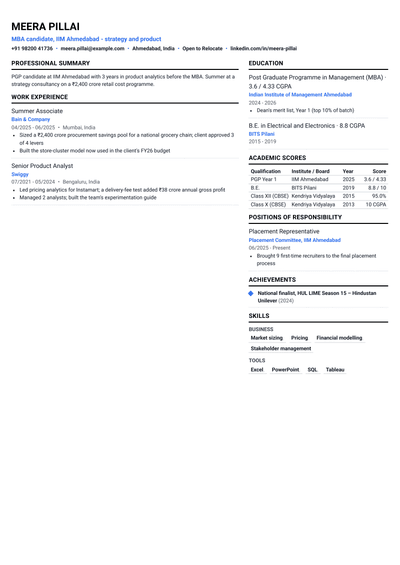
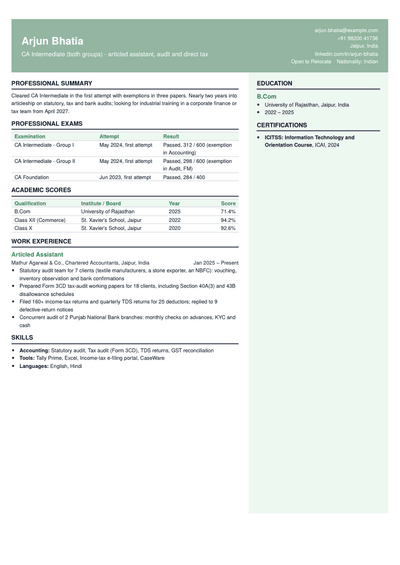
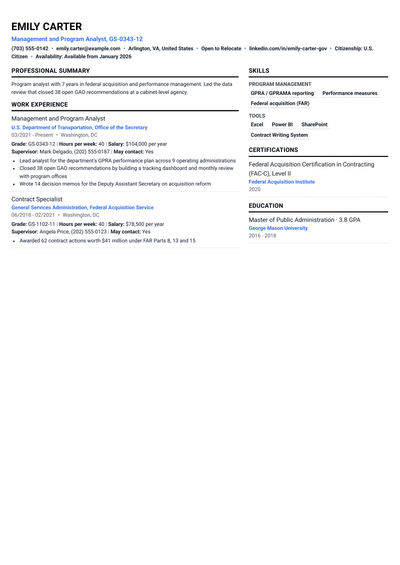
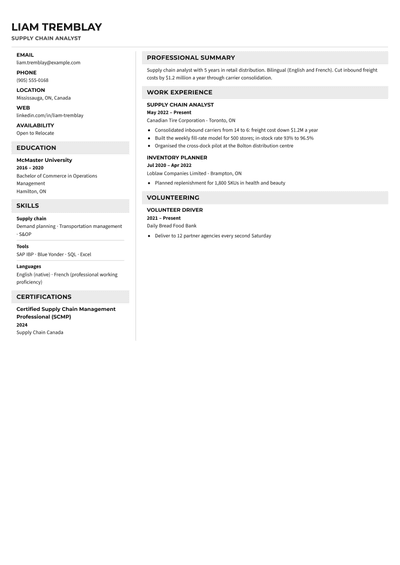
Two-column resume templates that fit more on one page
Layouts with a main column for your experience and a side column for skills, links and certifications. You fit more on one page, recruiters see your strengths at a glance, and most layouts still read cleanly in tracking software.
A two-column resume splits the page into a wide main column and a narrow side column. The main column holds the parts a recruiter reads line by line: summary, experience and projects. The side column holds short items they scan: contact details, skills, tools, languages, certifications and links. The result is a denser page that still looks organised, which is why two-column layouts are popular with people who have a lot of skills to show on one page.
What goes in each column?
Main column: summary, work experience, projects and, for students, education. Anything with full sentences and results.
Side column: contact details, links, skills grouped by type, tools, languages, certifications and short awards. Items of one to five words.
A simple test: if an item needs a full sentence to make sense, it belongs in the main column.
Are two-column resumes ATS-friendly?
Most modern applicant tracking systems read two-column PDFs well when the text is real text and the headings are standard. The risk comes from older systems that read straight across the page, mixing a skill from the side column into a line of your work history. The two-column templates here keep each column as clean text with standard headings, and all of them except Brand and Graphic Designer are marked ATS-safe.
Before you apply to a large company, run your file through the ATS resume checker and confirm that every section was read. If you apply mostly through online forms, a one-column layout from the ATS-friendly templates is the safest choice.
Advantages and disadvantages
Pro: fits more on one page without shrinking the font.
Pro: skills and tools are visible at a glance, which suits technical roles.
Pro: looks organised and modern without needing graphics.
Con: a small risk with older tracking systems.
Con: less room per line in the main column, so long bullets wrap more.
Con: conservative employers may see it as less formal.
Who should use a two-column resume?
Two-column layouts suit developers, data analysts, IT professionals, accountants and healthcare workers with many tools, licences or certifications to list. They also help internship and MBA applicants who need to show coursework, projects, competitions and positions of responsibility on one page, and career changers who want transferable skills visible next to their work history.
When to avoid a two-column resume
Choose one column if the job post asks for a plain resume, if you are applying to government or older corporate systems, or if your experience needs long bullets that would wrap badly in a narrower column. Senior leaders with a long history are usually better served by a one-column layout that gives each role full width.
One column or two columns?
Pick two columns when your strength is breadth: many skills, tools or certifications. Pick one column when your strength is depth: a few roles with long, impressive results. If you cannot decide, build both. Your content stays the same when you switch templates, so you can keep one version for each kind of employer.
How to format a two-column resume
Keep the side column to about a third of the page width.
Use the same headings as any resume: Skills, Certifications, Languages.
Write skills as words, never bars, dots or percentages.
Keep bullets in the main column to two lines at most.
Balance the columns so neither runs much longer than the other.
A two-column resume example, section by section
Here is how a made-up backend developer with two years of experience, Rahul Verma, fills in a two-column template:
Side column: contact details and GitHub; Languages: Java, Python, SQL; Frameworks: Spring Boot, FastAPI; Tools: Docker, AWS, Git; Certifications: one cloud certificate; Languages spoken: English, Hindi.
Main column: a two-line summary, one role with four bullets such as "Cut checkout API latency from 900 ms to 250 ms by adding caching and query indexes", two projects with links, and his B.Tech on one line.
A recruiter sees his stack in two seconds and his results in ten. Everything still fits on one page.
Tips for an effective two-column resume
Put the skills the job asks for at the top of the sidebar, not in alphabetical order.
Repeat your most important skills in an experience bullet, so the recruiter sees where you used them.
Keep the sidebar to five or six short groups. More than that becomes a wall of words.
Write links as readable addresses, such as github.com/rahulverma, so they work in print too.
Which two-column template should you choose?
Developer: your tech stack in the sidebar, projects and experience in the main column.
Analyst: SQL, Python and BI tools at a glance, with results alongside.
Accountant: certifications and software in the sidebar.
Internship: coursework and skills next to your projects.
MBA (B-school): dense, structured and built for placement season.
Career Change: transferable skills visible beside your past roles.
Common two-column mistakes
Putting work experience in the narrow column, where results get cramped.
Stuffing the sidebar with every tool you have touched. Keep the ones the job asks for.
Using icons instead of words for phone, email and links.
Skipping the ATS check because the page looks good.
Yes, for most employers. It works especially well for technical roles and anyone with many skills or certifications. If the job post asks for a plain resume, use one column instead.
Can an ATS read a two-column resume?+
Most modern systems can, when the text is real text and the headings are standard. Some older systems read across both columns. Check your file with an ATS check before applying to large companies.
What should go in the left column of a resume?+
Short items: contact details, links, skills, tools, languages and certifications. Work experience and projects go in the wider column.
Are two-column resumes good for freshers?+
Yes. They help freshers show coursework, skills, projects and activities on one page. Keep education and projects in the main column.
Should a two-column resume be one page?+
Usually, yes. Fitting more on one page is the main reason to choose two columns. If you need two pages, a one-column layout is often easier to read.
Is a two-column resume professional?+
Yes, when it uses restrained colour and clean type. For very conservative employers such as some banks and government departments, a one-column layout is safer.
Which side should the sidebar be on?+
Either works. A left sidebar puts skills first in reading order. A right sidebar puts experience first. Choose based on which matters more for the role.
Can I switch from two columns to one later?+
Yes. Your content stays the same when you change templates, so you can keep a two-column and a one-column version and send whichever fits the employer.
Show more of what you can do, on a single page
Pick a two-column template, add your details or upload your old resume, and check your ATS score before you apply.