Modern resume templates that look current and still get read
Fresh layouts with a touch of colour, clear type and smart use of space, built for tech, startups, marketing and anyone who wants a resume that feels up to date. Almost all of them read cleanly in tracking software.
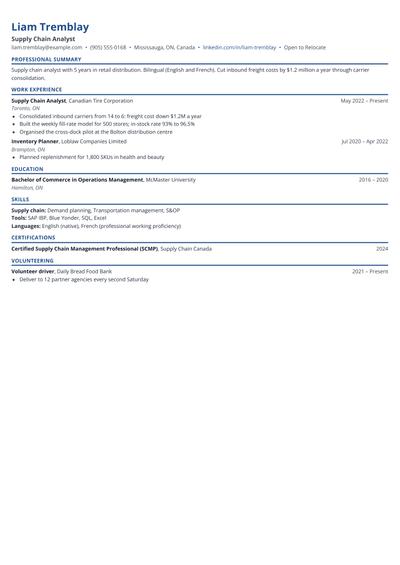
A modern resume template is a layout that uses colour accents, clear type sizes and smart spacing to look current, while keeping the same sections recruiters expect. Some modern templates use a single column with a coloured header. Others add a narrow sidebar for skills, links and languages. The aim is a page that feels fresh and is fast to scan, without the clutter of graphics, photos or skill bars that older "creative" templates relied on.
Are modern resume templates ATS-friendly?
Most modern templates here are. They use real text, standard headings and no icons in place of words, so applicant tracking systems can read them. Two things decide how safe a modern layout is:
Columns. One-column modern templates are as safe as simple ones. Two-column templates read well in most systems, but a few older systems read across both columns.
Decoration. The Brand and Graphic Designer templates are built for people who send a portfolio and are read by a person first. They are not marked ATS-safe.
If you apply through company career sites, choose a one-column modern template and run your file through the ATS resume checker before you send it.
What does a modern resume include?
A headline under your name: your target role and one fact, such as "Product Designer, B2B SaaS".
Links: LinkedIn, plus GitHub, a portfolio or a personal site if they show real work.
A short summary: two or three lines with your best result.
Skills near the top: grouped by type, so a recruiter sees your stack at a glance.
Experience and projects: results-led bullets, with tools named in the line where you used them.
Education and certifications: short, unless you are a student or recent graduate.
What makes a good modern resume layout?
One accent colour, used for your name, headings or a thin rule, never for body text.
A clear size hierarchy: name, then section headings, then job titles, then body text.
Generous white space, so each role stands on its own.
Skills written as words, not bars or star ratings that software cannot read.
Contact details in the body of the page, not in an image or a header that some systems skip.
Who should use a modern resume template?
Modern templates suit software developers, data analysts, product managers, designers, marketers, sales teams and anyone applying to startups, tech companies or agencies. They also work well for freshers and students who want a page that feels energetic without looking unserious. If you are moving from a traditional industry into tech, a modern layout signals that shift before the reader reaches your first bullet.
When to avoid a modern layout
Banks, law firms, government departments and many hospitals still prefer a conservative page. For those roles, a simple or professional template is the safer choice. The same goes for any employer whose job post asks for a plain text resume.
Modern or traditional: how to decide
Look at the company's own website and job post. If they use bold colours, casual language and talk about speed and ownership, a modern resume fits. If they talk about compliance, process and tradition, go traditional. When in doubt, a one-column modern template with a single muted colour works almost everywhere.
A modern resume example, section by section
Here is how a made-up product analyst with three years of experience, Meera Pillai, fills in a modern template:
Header: name in the accent colour, with "Product Analyst, consumer apps" underneath and email, phone, Bengaluru, LinkedIn and a portfolio link on one line.
Summary: "Product analyst with three years in consumer apps. Found the onboarding drop-off that, once fixed, lifted week-one retention by 11%."
Skills: SQL, Python, Amplitude, Looker, A/B testing, stakeholder reporting, in two short rows.
Experience: two roles with four results-led bullets each, naming the tool used in the bullet where it mattered.
Projects and education: one side project with a link, then the degree on one line.
The colour sits only in the name and headings. Everything else is black text on white, which keeps the page readable on screen, in print and in tracking software.
One column or sidebar: choosing a modern layout
A one-column modern template gives each role full width and is the safest with tracking software. A sidebar layout puts skills, links and languages in a narrow column, which helps when your strength is a long list of tools. If your bullets are long and results-heavy, choose one column. If your stack is long and your roles are short, choose the sidebar. Both can be switched later without retyping.
How to customise a modern template
Upload your current resume and let your details fill the layout, then fix only what needs fixing.
Reorder sections so your strongest one comes right after the summary.
Rename optional sections to match your field, such as Publications, Portfolio or Open Source.
Check your ATS score, then download a PDF that keeps the layout exactly as you see it.
Which modern template should you choose?
Developer: a skills sidebar for your stack and space for projects and GitHub.
Analyst: for data and business analysts, with tools and results side by side.
Modern Split: a balanced two-column layout for any role.
Startup: one column, light and direct, for fast-moving teams.
Contemporary: a modern take on the classic one-column page, safe for almost any employer.
Fresher: education and projects first, with a friendly modern look.
Tips for a modern resume that gets interviews
Let the content lead. A modern look gets a second glance. Results get the interview.
Keep the sidebar short: skills, links and languages. Experience belongs in the main column.
Match the skills in the job post that you really have. The resume keyword scanner shows what is missing.
Print it once in black and white. If it still reads well, the design is doing its job.
Mistakes to avoid
Skill bars and star ratings. They carry no information a recruiter can trust and no text software can read.
More than one accent colour, or colour in body text.
A photo, unless the country or role expects one.
Putting your work history in the sidebar, where it gets squeezed and skimmed.
Not better, just a better fit for some employers. Tech, startups and marketing teams often like a modern look. Banks, law firms and government roles usually prefer a traditional page.
Can a modern resume pass ATS?+
Yes, if it uses real text, standard headings and no graphics in place of words. One-column modern templates are the safest. Check your file with an ATS check before you apply.
Is it okay to use colour on a resume?+
Yes, in small amounts. One muted accent colour for your name or headings looks polished. Keep body text black so it prints and reads well.
Should a modern resume have a photo?+
No, for jobs in India, the US, the UK and Canada unless the employer asks. A photo takes space from your results and can introduce bias.
Are modern templates good for freshers?+
Yes, especially for tech, product and marketing roles. Choose one that puts education and projects first and keep it to one page.
What goes in the sidebar of a modern resume?+
Short items: contact details, links, skills, languages and certifications. Experience, projects and results belong in the main column.
What fonts work for a modern resume?+
Clean sans serif fonts such as Inter, Lato, Calibri or Arial at 10 to 11 points for body text. The templates here set the fonts for you.
Can I switch from a modern to a simple template later?+
Yes. Your content stays the same when you change templates, so you can keep a modern version for startups and a simple version for large companies.
Stand out with a resume that looks as current as your skills
Pick a modern template, add your details or upload your old resume, and check your ATS score before you apply.