Simple resume templates that let your experience do the talking
Clean, one-column resume templates with plain headings and plenty of white space. Recruiters find what they need in seconds, tracking software reads every line, and your results stand out instead of the design.
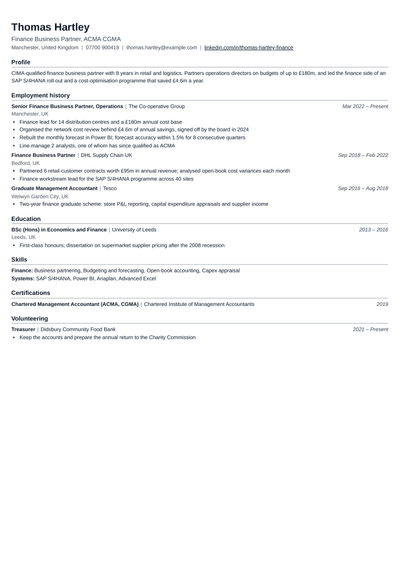
A simple resume template is a plain, one-column layout with standard section headings, one or two fonts, little or no colour and no graphics. Everything on the page is text, laid out in the order a recruiter expects: contact details, summary, experience, education and skills. The design stays out of the way, so the reader notices what you achieved rather than how the page looks. Simple does not mean empty or old-fashioned. A good simple template uses spacing, bold job titles and aligned dates to make the page quick to scan.
Are simple resume templates ATS-friendly?
Yes, they are the safest choice. Applicant tracking systems read a resume from top to bottom and sort the text into fields such as job title, dates and skills. A single column, standard headings and real text with no icons or images are exactly what these systems handle best. Every simple template on this page follows those rules. If you want to compare layouts by how well software reads them, see the ATS-friendly resume templates.
What is the best simple resume format?
For most people, the best simple format is reverse-chronological: your most recent role first, then the one before it. It is what recruiters expect and what tracking software reads most reliably. Freshers can move Education and Projects above Experience. Career changers can add a short skills section under the summary. Keep the rest of the layout the same, so the page still reads in one clear line from top to bottom.
What sections should a simple resume include?
Contact details: name, phone, a professional email, city and a LinkedIn link.
Summary: two or three lines on who you are, your strongest result and the role you want.
Experience: job title, company, dates and three to five bullets per role, each with a result.
Education: degree, college and year, plus your score if it helps.
Skills: the tools and abilities the job asks for that you really have, grouped by type.
Optional: projects, certifications, languages or awards, only when they support the job you are applying for.
How to format a simple resume
Font: one readable font such as Calibri, Arial, Georgia or Garamond, at 10.5 to 12 points for body text.
Margins: half an inch to one inch on every side, so the page never looks crowded.
Headings: plain words such as Experience and Education, in bold or capitals, with a little space above each one.
Dates: one style everywhere, such as Mar 2023 to Present, aligned on the right.
Length: one page for under five years of experience, two pages only when every line earns its place.
Colour: black text, with at most one muted accent for your name or headings.
Every template on this page already follows these rules, so you only need to add your content.
A simple resume example, section by section
Here is how a made-up operations executive with four years of experience, Karan Malhotra, fills in a simple template:
Summary: "Operations executive with four years in e-commerce fulfilment. Cut late deliveries by 30% across two warehouses. Looking for an operations lead role."
Experience: two roles, four bullets each, such as "Rebuilt the daily dispatch plan, raising same-day shipping from 62% to 85% of orders."
Education: BBA, with the year, on one line.
Skills: inventory planning, vendor management, Excel, SQL basics, team leadership.
Nothing on the page is decoration, and every line answers the question a recruiter is asking: can this person do the job?
Who should use a simple resume template?
Anyone applying through online forms at large companies, where tracking software reads the resume first.
People in formal fields such as banking, law, government, healthcare, teaching and accounting.
Freshers and students who want their projects and education to stand out without any visual noise.
Experienced professionals with a strong record, where the results speak for themselves.
When a simple template is not the best choice
If you work in design, marketing, content or another field where taste is part of the job, a layout with more personality can help, as long as you also share a portfolio. Startups and creative agencies often read resumes by hand, so a little colour does no harm there. In those cases, look at the modern resume templates, which keep the structure clean but add more visual style.
Simple, professional or modern: which style fits you?
Simple: the plainest layout. Best when you want zero risk with tracking software and a fast read.
Professional: a little more structure, such as ruled section lines and a stronger header. Best for mid-career and senior roles in formal industries.
Modern: colour accents and sometimes a sidebar. Best for tech, startups and marketing, where a fresher look fits the culture.
Which simple template should you choose?
LaTeX Classic: dense and tidy, popular with engineering and tech students.
For most jobs, yes. Recruiters skim a resume quickly and tracking software reads text, not design. A simple layout makes both jobs easy. A designed resume helps mainly in creative fields, and only when a person reads it first.
Can a simple resume still look professional?+
Yes. Even spacing, bold job titles, aligned dates and one accent colour make a plain page look polished. What makes a resume look unprofessional is clutter and inconsistency, not a lack of graphics.
What is the best font for a simple resume?+
A widely available font such as Calibri, Arial, Georgia or Garamond, at 10.5 to 12 points for body text and slightly larger for your name. Use one font throughout.
How long should a simple resume be?+
One page if you have under five years of experience, two pages if you have more and every line is relevant. Some country formats and academic CVs run longer.
Is a simple resume good for freshers?+
Yes. It keeps the focus on your education, projects and internships, and campus drives often screen resumes with software that reads simple layouts best.
Can I add colour to a simple resume?+
A single muted accent for your name or section headings is fine. Keep body text black and avoid coloured backgrounds, which can make the page hard to read and print.
What is the difference between a simple and a basic resume?+
Most people use the words to mean the same thing: a clean, text-only layout. The templates here are simple in design but complete in content, with room for a summary, results and skills.
Should a simple resume have a photo?+
Not for jobs in India, the US, the UK or Canada unless the employer asks. A few countries, such as Germany, more often expect one, so check the country format first.
A simple resume that gets you the interview
Pick a simple template, add your details or upload your old resume, and check your ATS score before you apply.